PhoSplit
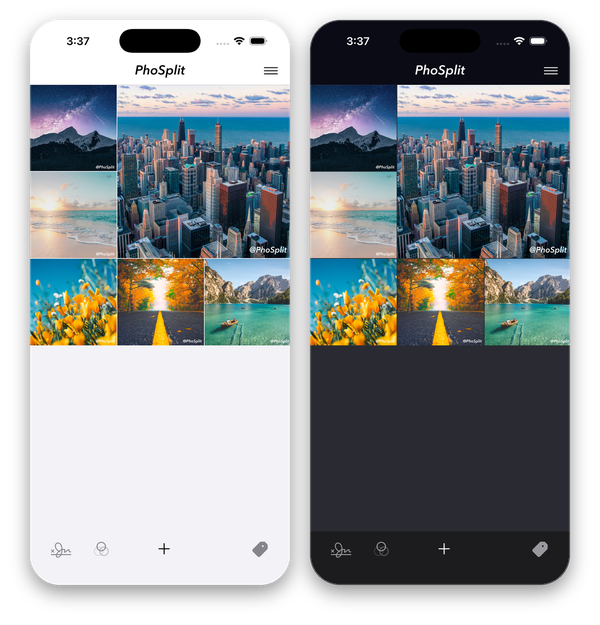
One photo, one striking grid. PhoSplit splits a single photo into up to 25 pieces that line up perfectly on your Instagram profile, adds the filter and watermark you want, and helps you post them in the right order. All on your iPhone, with your photos never leaving the device.

Three steps to a grid post
A grid post is a single photo cut into tiles and uploaded one by one so they join back together on your profile. PhoSplit does the cutting, the numbering, and the posting order for you.
Pick a photo
Choose from your library, shoot a new one, or send a photo straight from the Photos app with the PhoSplit share extension.
Filter and split
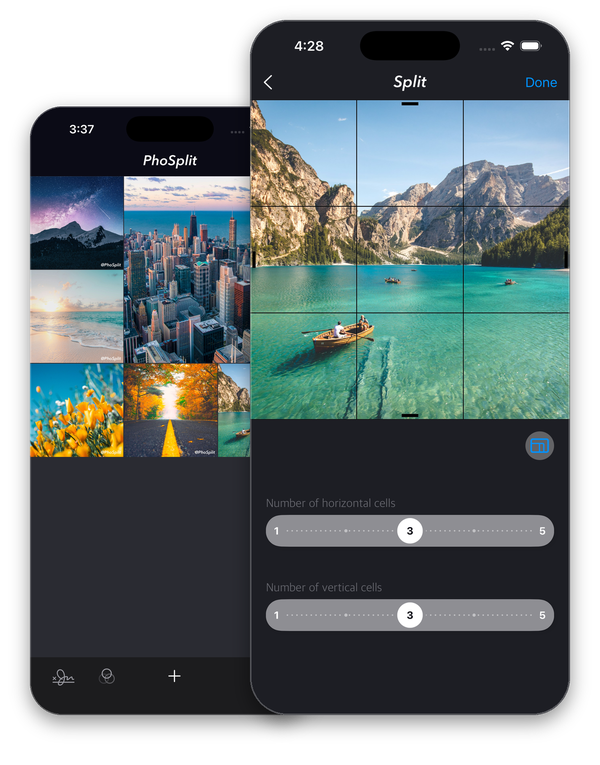
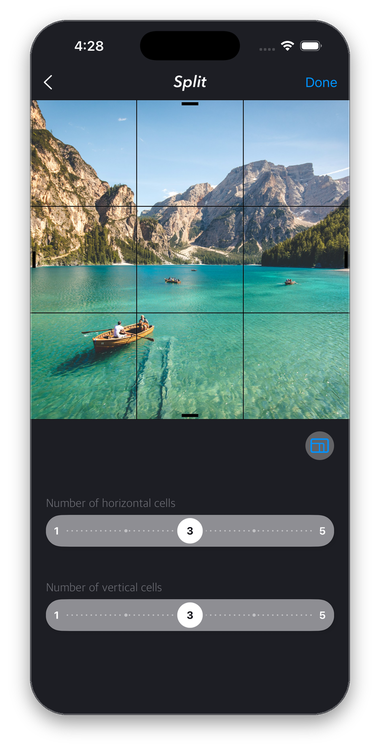
Apply a filter, then drag the sliders to choose how many columns and rows you want. Square or rectangular, 1×2 up to 5×5.
Post in order
Send each piece to Instagram in the correct sequence, save the whole set to your album, or share it to any other app.
Split Into Up to 25 Pieces
Most grid apps stop at a 3×3 square. PhoSplit lets you pick any layout from a simple 1×2 pair to a full 5×5 mosaic, and the columns and rows do not have to match, so a wide landscape can become a 4×2 banner and a tall portrait a 2×3 panel. The grid lines are drawn live on your photo while you move the sliders, so you see exactly where each cut lands before you commit.
Because you choose the crop and the layout together, faces and horizons stay where you want them instead of being sliced through the middle. Every piece is exported at full resolution, so the joined grid on your profile looks as sharp as the original photo.
- Any grid from 1×2 to 5×5, square or rectangular
- Live grid preview with adjustable crop
- Full-resolution pieces, numbered in posting order
Big landscapes, panoramas, and portraits finally fit your feed. Pick the grid, not the compromise.
354 Filters, Tuned by You
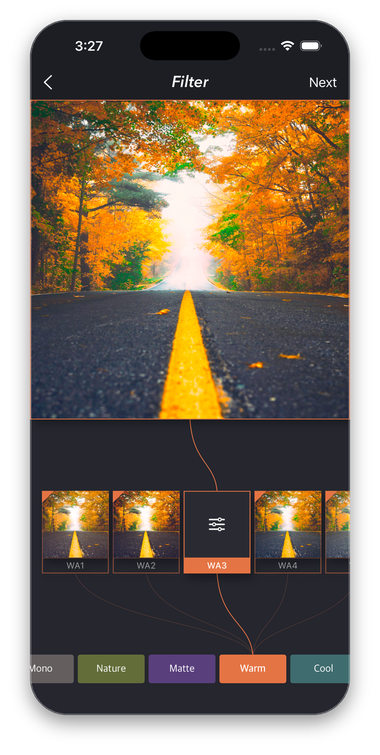
PhoSplit ships with 354 presets organised into categories such as Urban, Rainbow, Effect, Instant, and Retro, so you can flip through a whole mood in a few taps. Every preset is rendered on the GPU with Core Image and Metal, which keeps scrubbing through the thumbnails instant even on a large photo.
A preset is only a starting point. Open the controls to set the filter intensity, add a vignette, or correct the exposure, and the change is applied to the whole photo before it is split, so all of your pieces match perfectly. Reorder the categories in the filter manager so your favourites always come first.
- 354 presets in curated categories
- Intensity, vignette, and exposure sliders
- Instant GPU previews; consistent colour across all pieces
Set the look once and every tile inherits it. No more mismatched colours between the pieces of your grid.
Your Name on Every Photo
Stamp a text watermark in the font, colour, and size you like, or drop in your own logo as an image watermark. Drag it to one of the anchor points, fine-tune the size, offset, and opacity with sliders, and PhoSplit keeps the watermark identical across every photo you save.
The watermark tool also works on its own, without splitting. Select a whole batch of photos from your library, apply your saved watermark to all of them at once, and save them back to the album, which makes it a quick way to sign photos before sharing them anywhere. Home screen quick actions jump straight into watermarking or filtering with a long press on the app icon.
- Text or image (logo) watermark with custom fonts and colours
- Size, offset, and opacity sliders with nine anchor positions
- Batch-apply to many photos and save them in one go
Protect your work and build your brand: the same signature on every piece, every post.


Every Grid, Ready to Repost
Each grid you make is saved as a project, complete with its layout, filter settings, and watermark. Open the Explore view to flick through the pieces one by one, check the resolution and aspect ratio, and share or save a single piece or the whole set again whenever you need it.
Tag your projects to keep campaigns, clients, or trips together and find them again in a tap. Long-press any project to send it to Instagram, save it to your album, share it to another app, or delete it.
Your grids, your settings, and your posting order are kept together, so reposting takes seconds.
Free to Start, Premium When You Need More
PhoSplit is free to download and lets you split, filter, and watermark photos right away. Premium is for people who post grids regularly: it removes the small PhoSplit watermark from saved photos, lets you design your own watermark, unlocks every filter, including new ones added in updates, and removes the project limit.
Free
$0
- Split into any grid up to 5×5
- Basic filters with adjustable intensity
- Post to Instagram, save, and share
- Up to 12 saved projects
- Small PhoSplit watermark on saved photos
Premium
$0.99 / month · $9.49 / year
- Everything in Free
- No PhoSplit watermark on saved photos
- Custom text and logo watermarks
- All 354 filters, plus every filter added later
- Unlimited projects
Premium is an auto-renewing subscription billed through your Apple Account. Prices are shown in US dollars and may vary by region; the exact price is displayed in the app before purchase. Cancel any time in Settings > Apple Account > Subscriptions. Purchases can be restored on any device signed in with the same Apple Account.
Private by Design
PhoSplit never uploads your photos. Splitting, filtering, and watermarking all run on the iPhone's own GPU, which is why there is no sign-up, no waiting for a server, and no risk of a client's unpublished campaign leaving your device. The app asks only for the permissions it needs: your photo library to pick and save photos, and the camera only if you choose to shoot from inside the app.
The interface follows iOS, with system icons, Dynamic Type, and full light and dark appearance support, so it feels at home next to the Photos app. PhoSplit is localised in English, Korean, and Japanese.
No account, no cloud, no tracking. Just your photos, cut and signed the way you want.